kathy@kathyschrock.net

Showing posts with label IPEVO. Show all posts

Tuesday, August 10, 2021

V4K PRO Ultra HD USB Document Camera

I have been a long time supporter and user of IPEVO products. Their ability to provide low-cost, high quality technology hardware and software specifically created for education is awesome! I have reviewed their offerings on the blog for many years, and you can see those posts here.

Their newest offering is the $149 V4K PRO Ultra HD USB Document Camera. What sets this new offering apart from their other document cameras is its upgraded audio and video performance. 

IPEVO's document cameras have been utilized by educators during their virtual teaching sessions these past two years. With the V4K PRO Ultra HD USB Document Camera, educators now have a device whose microphone can filter out background noise as well as has a high resolution 8 megapixel lens (3264 x 2448 resolution) for increased clarity. This document camera is compatible with PC, Mac, and Chromebook. It is also plug-and-play compatible with many online video-conferencing tools such as Zoom, Google Meet, Skype, Microsoft Teams, and with software such as Seesaw and Camtasia.


The V4K PRO Ultra HD USB Document Camera is perfect for mirroring items, creating instructional videos to use for blended learning, and taking photos and sharing them with students. In addition, with its LED light, microphone and articulated components, can also be used as a high resolution webcam!


The microphone on the
V4K PRO Ultra HD USB Document Camera includes an AI-enhanced voice technology created by IntelliGO. This noise filter removes any background noise to allow for clear and quiet conversations with students or peers.

Here is my test of the noise reduction feature. It is truly amazing!


The built-in LED light, at 172 lux, lights up the stage when using the camera, even if you are in low light. This light output is higher than the recommended workspace light for those ages 25-65 and provides a bright light. In addition, in the video above, I used the
V4K PRO Ultra HD USB Document Camera as both a Webcam and a light source for lighting up my face in a low light situation!

Here is a video from IPEVO which showcases all of the features of the V4K PRO Ultra HD USB Document Camera.


For those of you who want to know the inside scoop on the specs of the
V4K PRO Ultra HD USB Document Camera here you go!

Size 

  • (when folded) 10.91" x 3.07" x 1.89" (277 x 78 x 48mm)

Weight

  • 1.28lbs (581g)

Camera

  • Sony 8 megapixel camera
  • Resolution up to 3264px x 2448px
  • Frame rate up to 30 FPS
  • 12X digital zoom using IPEVO Visualizer software
  • Autofocus range of 10cm ~ ∞ / 3.93” ~ ∞

 Built-in features

  • Omni-directional microphone with EMI filter
  • LED light (172 lux)
  •  AI enhanced voice technology from IntelliGO
  •  Physical control buttons
    • Exposure
    • Noise reduction on/off
    • LED light on/off
    • Focus 
  • Maximum capture area of 13.46” x 10.04” (342 x 255mm) 
  • Attached USB-A cable of 4.90ft (150cm) 
 
The V4K PRO Ultra HD USB Document Camera is very compact, easy to carry back and forth from school, and includes both a great microphone and noise reduction properties that are amazing! Besides working with all the computer platforms and many apps as a document camera, the V4K PRO Ultra HD USB Document Camera allows students or educators the ability to create instructional videos that include the "talking head" and the item on the "stage" that is being discussed and marked up!
  
Thank you to IPEVO for letting me try out this cool new document camera!


Wednesday, February 24, 2021

IPEVO Whiteboard and VZ-X

Back in July 2020, I wrote a review of the IPEVO VZ-R HDMI/USB Dual Mode 8MP Document Camera ($219). That is a great document camera with excellent optics and many useful features. 


Since then, IPEVO has also released the IPEVO VZ-X Wireless/HDMI/USB 8MP Document Camera ($329) which has the same excellent optics but with the addition of built-in wireless! With this wireless capability, you can easily connect the document camera to your computer, AppleTV and your iOS or Android device!


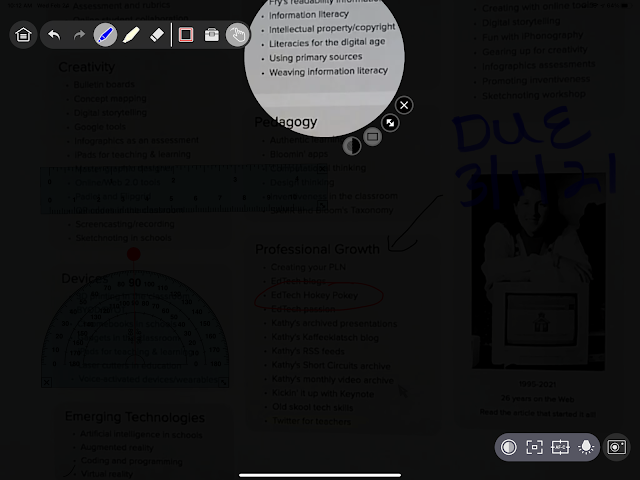
IPEVO has released a new version of their IPEVO Whiteboard software for iPad to take advantage of this wireless connectivity. Simply connect your IPEVO wireless document camera via WiFi to an iPad or Android tablet using IPEVO Whiteboard. You can then display, adjust, draw, or annotate on the live image. You can also take snapshots or record videos, and add annotations and audio. In addition, you can start from a blank whiteboard and record yourself as you annotate and bring in assets.

I decided to give the new IPEVO Whiteboard for iPad a try. It is now optimized for the Apple Pencil, too, and includes an easy-to-use pallete for color, lines, highlighters, and shapes.


IPEVO Whiteboard also includes advanced tools such as a ruler and a protractor which would come in handy for math lessons. There is also a Spotlight tool which can help you draw the student’s attention to important sections of the screen. You can also use the Attach function to add an image, text, map, and more to the whiteboard. 


If you pick the video recording option, you can record your material with audio and annotations as you conduct live lessons or your introduction to a unit. This is great asset for students who need to review the material again or for a flipped classroom model. 

I created a blank whiteboard and picked the video option.


The IPEVO Whiteboard for iPad comes in two versions — the regular version and the Pro version. The Pro version adds the advanced features of disappearing ink, the ability to add a browser window or a map, some background templates, picture-in-picture capability, and more! 

The Pro version of IPEVO Whiteboard for iPad is $1.99 per month or $19.99 for a year and is available as an in-app purchase.


Monday, November 30, 2020

IPEVO's Uplift and iDocCam make a perfect pair!

Although having a dedicated document camera, like IPEVO's DO-CAM which I reviewed here, there is another great solution from IPEVO that takes advantage of using your own smartphone as the document camera feed.

The IPEVO Uplift is a multi-angle arm for smartphones. You simply insert your smartphone in the padded clip, and adjust the arm to any angle or orientation you want to! The sturdy base keeps the IPEVO Uplift from tipping over. 


You can use your phone attached to the Uplift as a Webcam to show your face and arms when you are demonstrating a science lab or a basketball move, showcase a page in a book or a text piece, use it for holding the phone still when you are creating a stop-motion animation, do a close-up on an object, and it allows you to use your hands to record a paper slide or Common Craft-type video for your students!


There are two secret sotware ingredients to this process. The first is the IPEVO Visualizer software (no cost) which is available for Mac, Windows, and Chrome. The IPEVO Visualizer allows you to display the video from any camera feed, record it, modify it, and more. You can use it to show what your camera sees, either on a big screen or in an online video conferencing app.

With Visualizer you can adjust the displayed image in various ways. You can zoom in, rotate, mirror, change the resolution, adjust exposure, apply a video filter, take a snapshot, and more! 

The second secret ingredient is IPEVO's iDocCam app (iOS/Android) which allows you, in conjunction with the Visualizer software on your computer, to select your smartphone as the camera source for the desktop if the two items are on the same network. 

You can then wirelessly view, control, or adjust the live images captured by your smartphone's camera, such as educational instructions, worksheets, training guides, presentation notes using the Visualizer software.

IPEVO's iDocCam is not free, but is priced as a monthly or yearly subscription or you can purchase it outright. If you purchase an IPEVO Uplift, you get six months of iDocCam use included right now!

______________________________________________________________________

I did not receive any monetary compensation from IPEVO for writing this article. I did receive a copy of the iDocCam app and the Uplift Multi-Angle Arm so I could try things out!


Monday, August 31, 2020

IPEVO's Mirror-Cam

IPEVO is always coming up with useful, low-cost ways to help teachers support teaching and learning. From the early days of the Point-to-View (P2V) small document camera to their current line of powerful document cameras, IPEVO's new Mirror-Cam is a game-changer! It utilizes your webcam and your keyboard area to project an object, books, or papers to your computer. The Mirror-Cam is the perfect addition to your videoconferencing toolbox.

The mirror inside of the Mirror-Cam reflects the keyboard area of your laptop and your webcam perfectly captures the reflected image.


The Mirror-Cam comes in a set of six. You simply assemble them, and set the Mirror-Cam on the top edge of your laptop screen, covering the webcam. It is easy to attach and take off, so your webcam is still accessible for presenting, too. And the Mirror-Cam folds down easily to keep it in your computer accessories bag.


Watch the video to learn more!


(Update 9/10/20) The Mirror-Cam is back in stock now! And, at least right now, there is no limit on the number that can be purchased!


While you visit IPEVO's store page, take a look at some of their other offerings. I have recently reviewed the portable DO-CAM and the upgraded VZ-R document camera. (BTW, I receive the devices from IPEVO to review, but I don't get any money if you purchase the items.)

TRYING IT OUT!

In the video below, I started from scratch, assembled and "installed" the Mirror-Cam, and showed a few projections from items sitting on my laptop keyboard!


Wednesday, August 19, 2020

IPEVO's cool new DO-CAM

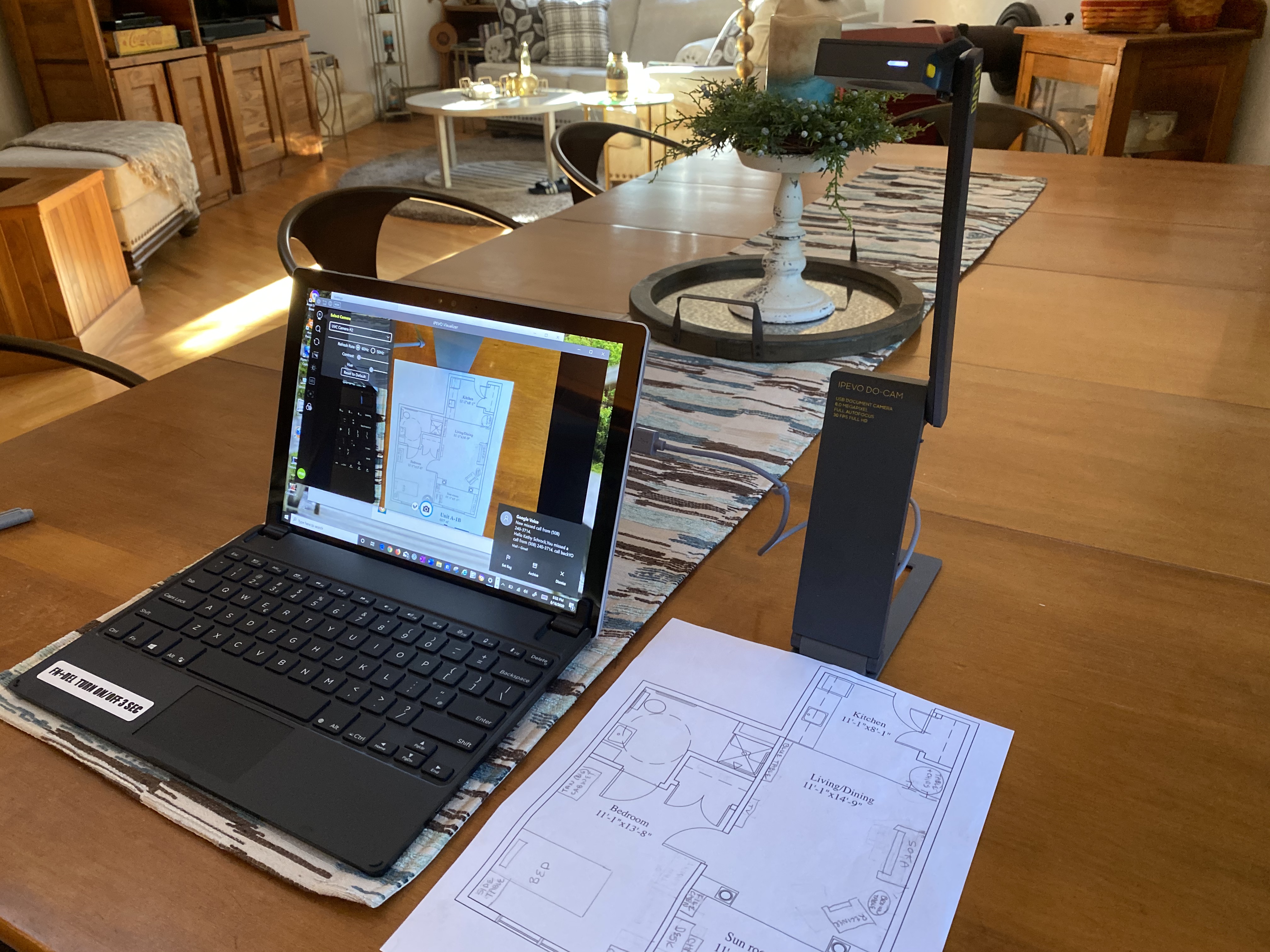
Since many K-12 schools and universities may still be including some type of remote or blended teaching and learning in the education mix for this coming school year, having a document camera can help support both the students in the classroom and those watching online. In addition, when meeting with students for content support, a doc cam can allow you to show the doc cam video in a Zoom or Google Meet window for the students.

Since many lessons include both digital and analog assets, like math manipulatives, science lab materials, and textbooks, a document camera can support the times educators need to show the student something -- whether it be a demo of a art lesson, a certain passage in a book, or the process of assembling a robotic component.

IPEVO has a host of document cameras available, and I recently reviewed their newly updated IPEVO VZ-R HDMI/USB Dual Mode 8 MP Document Camera. This document camera has a ton of features including HDMI connections, easy focus, and many more. 

However, many teachers just need a simple document camera to showcase work, writing or book pages as part of a lesson. Or they may need to record the lesson for student review, too! The new IPEVO DO-CAM HD Ultraportable 8MP USB Document Camera /Webcam fits the bill, and it is also becomes an external Web camera by just flipping up the top!


At a $129 list price, this lightweight (12 oz.), USB-powered device is the perfect addition to your desk at school or at home. It is easy to carry the IPEVO DO-CAM back and forth from home if you need to -- it has a small footprint and and a handy cable storage system. It works with Windows, Mac, and Chromebook computers. (The DO-CAM does not have a microphone, so you will have to use the mic in your computer or an external mic.)


The DO-CAM can be used to project a full sheet of paper and any 3D object. And, as I stated before, it can be used as a Web cam for your face, or for showcasing a student in the classroom who is demonstrating something. The DO-CAM can be used for many creative purposes! 


The DO-CAM works with IPEVO's free Visualizer software which is available for Windows, Mac, and ChromeOS. This software includes tons of ways to take advantage of the DO-CAM.
  • Snapshot
  • Videorecording
  • Slow motion recording
  • Live broadcast
  • Time-lapse recording
  • Scanning a QR code or a document
  • Magnify
  • Stop-motion
  • Split-screen
IPEVO also offers a tool called IPEVO CamControl for your Mac or Windows computer which allows you to control and adjust some basic image settings of your IPEVO USB document camera’s live images when you use it with third-party video conferencing software.

Scholastic provided some great ideas for use of a document camera in their article titled Tech Primer: Document Cameras. And the TECHNOKids site provides some interesting ways to use an external Web cam in the classroom, too!


DO-CAM FEATURES 

Image quality: DO-CAM comes with an 8MP Sony CMOS image sensor for exceptional performance in noise reduction and color reproduction. Capture details of your materials in Ultra HD resolution up to 3264 x 2448

2-in-1 Document Camera and Webcam: Flip the camera head of DO-CAM to switch back and forth between document sharing and ‘face to face’ communication. The Flip Button allows you to pick the correct image orientation at all times.

Lightweight and compact: Being the lightest on the market at 0.74lbs (335g), and having the size of a handheld pencil case, DO-CAM is convenient to use, store, and carry around.

The utmost stability and flexibility: All of DO-CAM's interconnected sections are fully adjustable to capture your content at different heights, angles, and orientations. A cable holder has been incorporated to store the attached cable.

UVC Camera compatibility: DO-CAM is USB Plug & Play compatible with MAC, PC and Chromebook. Use it with IPEVO's Visualizer software and any other third-party software of your choice.

Take a look at the IPEVO DO-CAM here and find out more about it! And this page from IPEVO includes the set-up for use of the DO-CAM with Zoom, Webex, Microsoft Teams and more, as well as a list of compatible software it works with, such as Camtasia, Google Meet, Skype, and more.

Monday, July 06, 2020

IPEVO VZ-R HDMI/USB Dual Mode 8MP Document Camera

IPEVO has been offering document cameras for schools for many years. Many of us started with their their first offering, the IPEVO P2V (Point to View) USB camera with its removable camera. (Who remembers the thrill the students got when they could show a bug at close range and full screen? Ugh.) That low-cost ($69) device demonstrated to us how effective a document camera could be in supporting teaching and learning.

IPEVO P2V CAMERA (2009)

________________________________

OVERVIEW

Fast forward to mid-2020, and IPEVO has just released their 8th gen model, the newly updated IPEVO VZ-R HDMI/USB document camera. This camera has functions we could only dream of in those early P2V days!

IPEVO VZ-R USB CONNECTION TO LAPTOP OR DESKTOP (2020)
Of course, true to its roots, the IPEVO VZ-R HDMI/USB can attach to a laptop, Chromebook, or computer desktop via a USB cable, and mirror what is on the "stage" for recording and sharing a screen of information with others. IPEVO offers two free software programs to support this: Visualizer and Visualizer LTSE (accessibility software to use with the document camera).
________________________________________________

USING THE IPEVO DOC CAMERA FOR REMOTE LEARNING

The IPEVO VZ-R HDMI/USB, using the USB mode, can be used to support remote  teaching, learning, and meetings. When in USB mode, the IPEVO VZ-R HDMI/USB also activates a built in microphone!

Many educators are submitting their uses of the IPEVO document cameras and sharing them with the rest of us.

IPEVO offers printed step-by-step guides for using the IPEVO VZ-R HDMI/USB in USB mode with some of the most popular online collaboration tools.
____________________________________
IPEVO VZ-R HDMI/USB plugged directly into a projector

The IPEVO VZ-R HDMI/USB document camera can also easily be used to showcase items, live drawings, and book pages to the entire class, even without a computer! Since this document camera also includes an HDMI connection, it can be plugged directly into a projector for mirroring and streaming on a whiteboard with no need for a computer.

___________________________________________________

IPEVO VZ-R HDMI/USB plugged directly into a monitor or TV

Since many classrooms now use a large touchscreen monitor or flat-screen television for projecting to the class, the IPEVO VZ-R HDMI/USB can also be plugged directly into the HDMI port on the monitor or TV and stream live to the big screen! This document camera includes easy-to-access adjustment buttons to use in any mode, too!

Full product manuals and information may be found here.
_________________________________________________________

TECH SPECS

Price
  • $219

Size
  • D x W x H (when folded)
    With base-4.57”x 4.25” x 11.85” (11.6 x 10.8 x 30.1cm)
    Without base-3.07” x 1.57” x 11.42” (7.8 x 4.0 x 29.0cm)
Weight
  • 2.2lbs (1.0kg)

Model
  • CDVH-03IP
Color
  • Emerald Green

Camera
  • 8.0 Megapixel
  • Full auto-focus lens
  • High definition resolutions-up to 3264 x 2448 (USB mode), and up to 1920 x 1080 (HDMI mode)
  • Up to 30 fps live video capture (at full HD)
  • Sony CMOS image sensor and a powerful Ambarella integrated system-on-a-chip (SoC)

Output
  • HDMI and USB

Maximum Shooting Area
  • 10.6” x 18.9” (270 x 480mm) [16:9]
  • 13.5” x 18.1” (344 x 460mm) [4:3]

Compatibility
  • Works with Mac, PC and Chromebook

Package Contents
  • Camera head and stand
  • Base
  • USB Type-C to Type-A cable (4.90ft/150cm)
  • Screwdriver
  • Screws x 4
Mac

Minimum Requirements
  • Intel® Core™ i5 CPU 1.8 GHz or higher
  • OS X 10.10 or higher
  • 2 GB RAM
  • 200MB of free hard disk space
  • 256MB of dedicated video memory (For lag-free live streaming up to 1920 x 1080)
Mac
Recommended Requirements
  • Intel® Core™ i5 CPU 2.5 GHz or higher
  • OS X 10.10 or higher
  • 4 GB RAM
  • Solid-state drive, and 200MB of free hard disk space
  • 256MB of dedicated video memory (For lag-free live streaming up to 1920 x 1080, and video recording of 1920 x 1080)

Windows
Minimum Requirements
  • Microsoft Windows 7 Service Pack 1 or higher
  • Intel® Core™ i3 CPU 3.20 GHz or higher
  • 4 GB RAM
  • 200MB of free hard disk space
  • 256MB of dedicated video memory (For lag-free live streaming up to 1920 x 1080)

Windows
Recommended Requirements
  • Microsoft Windows 10
  • Intel® Core™ i5 CPU 3.40 GHz or higher
  • 4 GB RAM
  • 200MB of free hard disk space
  • 256MB of dedicated video memory (For lag-free live streaming up to 1920 x 1080, and video recording of 1920 x 1080)
____________________________________________________________

UNBOXING

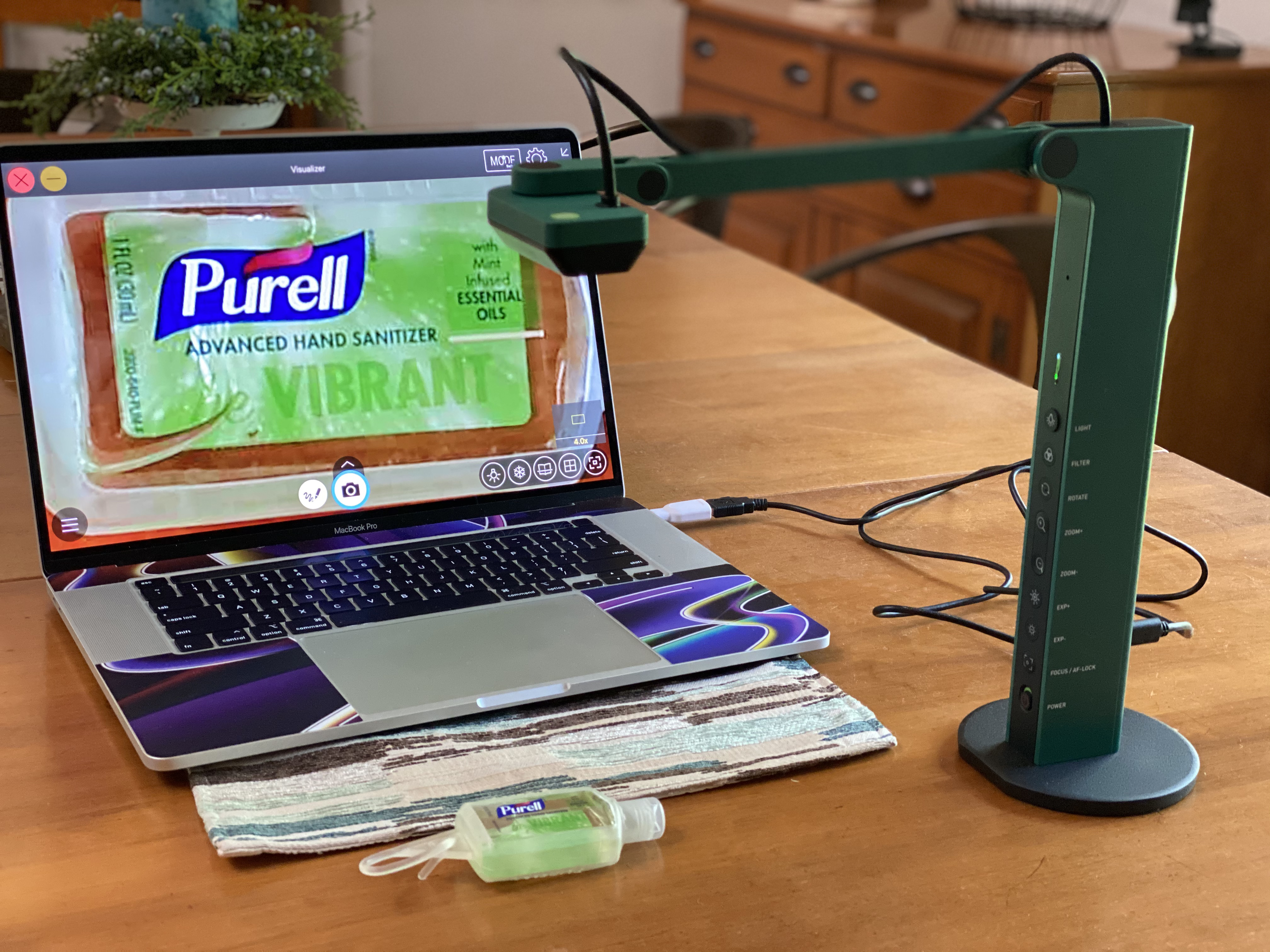
Below are two of the images taken I was putting the IPEVO VZ-R HDMI/USB through its paces. I attached the sturdy metal bottom plate, plugged it into my Mac, open the IPEVO Visualizer software, and I was ready to go!


You can find out more details of the IPEVO VZ-R HDMI/USB  and learn about the company's other products on the IPEVO site!