kathy@kathyschrock.net

Showing posts with label Macbook Air. Show all posts

Wednesday, January 18, 2012

I love bags and cases and holders...

Okay, I admit it. I love technology bags and holders of every type. I have roller bags, Vera Bradley laptop-holding bags and backpacks, neoprene cases for the Macbook Airs and iPad, and many, many more bags. I mean, it's like shoes...you have to have ones for the right purpose, right?

In any case, I thought I might share some of my newest bags, sleeves, cases, and holders with you, in case you are thinking about what works and what does not!

Tech Bags and Sleeves

The 11.6" Macbook Air is a hard item to find a special bag for. Here are some of my favorites.
Roocase 11'6" netbook case

Roocase has a bag in their netbook category that is for 11.6" items. It fits the small MBA well and you can even fit the iPad and cables in the bag, too. It comes in various colors, is sturdy, and has rubberized "feet" on the bottom to keep it clean when setting it down. The laptop compartment is padded and has a Velcro closure.  (I also have the larger version for the 13.3" Macbook Air.)


Be.ez LA Robe Allure


My favorite sleeves for my iPad and the 11.6" Macbook Air are made by Be.ez and are hard-sided and sturdy. The model is the LA robe Allure sleeve for iPad and 11.6" MBA. The LA robe Allure is also available for the 13.3" MBA and 13.3" and 15.4" Macbook Pros.


Tocano Finatex Extra Small


When I am really traveling light, and just want my iPad, my 11.6" Macbook Air, and my iPhone, I take a bag that I found in an airport technology shop-- my Tocano Finatex Extra Small. It holds all three items without any cases on them.


Sherpani Flite FL

The rolling bag I take with me most of the time is the Sherpani Flite FL. It is very well-made, has rolled handles to hold as well as a shoulder strap in case you do not want to use the extendable handle, and has a sturdy strap on the back for attaching to other luggage handles. It does not have an attached laptop sleeve area inside, but has a nice elastic strap for holding your laptop in place in its own sleeve. It is well-sized at 16.5" x 13.5" x 6". You often find it for sale on Overstock.


Tech Cases and Holders

I have all different types of cases for my iPad2. Again, it depends on how I am planning to use it as to which one I take with me!


One that I use around town is the YakPak Portfolio Case. (I picked mine up at Bed, Bath, and Beyond.) It is a nicely lined case with places for business cards, a small tuck-in area, and can hold the iPad with the Magic Cover on the front or back behind elastic corner straps. It is minimalist, but protects the device well.


IPEVO Typi Folio Case
When I need to have a keyboard with me, I use the IPEVO Typi Folio Case and Wireless Keyboard. What is nice about this well-made leather case, is that the keyboard is easily detached and used on the table. This comes in handy when you are working with someone since they can then see the iPad's screen easily or can share in the typing tasks! The Bluetooth keyboard has a nice touch and lasts through about 12 hours of typing.
IPEVO Typi Wireless Keyboard

The case itself is not bulky, and you can access all the ports on the iPad while the case is on and there is even an opening in the back of the case for the camera lens.

It is available on Amazon or from IPEVO. 


When I am presenting with the iPad, I have three different iPad holders I can use.

Higher Ground Podium iPad 2
The Higher Ground Podium iPad 2, which is a sturdy, reinforced nylon case like all of Higher Ground's products, also includes an innovative strap/Velcro method of adjusting the viewing angle of the iPad2 to your liking. This really helps when presenting on the podium, too. The iPad is held in by the built-in silicone case.


Higher Ground Podium iPad 2
 However, the coolest thing about the Podium iPad 2 is the built-in elastic hand holder on the back. (Not just a simple strap!) You can see from the photo that you slip your hand through the elastic and grip the edge of the case. It makes you feel safe carrying your iPad around the classroom, workshop, or conference area since you have a really good grip on it!


IPEVO Perch


The next item I use when presenting is the IPEVO Perch Desktop Stand. This iPad stand easily rotates from landscape to portrait mode and is a perfect "perch" for the presenter podium when using the iPad to present my talks. The Perch has a weighted base that comes in three lengths-- the small height I use at the podium, a taller one for using while sitting in a chair, and the tallest one that is its own podium! The Perch is available through Amazon or IPEVO.


Merkury Innovations Swing Stand

And, finally, the last iPad stand I use lives in my tech stuff carry bag. It is the Merkury Innovations Swing Stand. It is lightweight, foldable, allows the iPad to be either in landscape and portrait mode, and is easy to use on the tray table in the airplane! It also works with any tablet or eReader, too.


Addendum 1/19/2012: I have been wanting one of the Pan Am retro bags and finally found the Pan Am Secret Agent laptop bag at a "reasonable" price (and with a coupon) on Punk.com. They have just come out with a new version of this bag, which costs about 30% more, and I like the original one better, so I finally made the purchase. Can't wait to use it!


 What is your favorite tech bag, sleeve, case, or holder? Please share in the comments and include a URL so I can look at it! Thanks!

Saturday, October 30, 2010

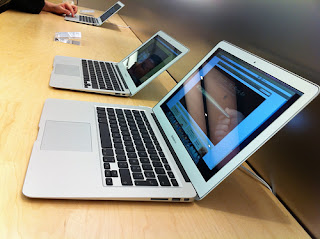
Macbook Air 11.6"

I had the first Macbook Air a few years ago for about a minute and a half. It was so slow and underpowered and it had that weird door that dropped down to plug things into that nothing could plug-in to! I sold it after a very short time.

I wavered on the purchase of the new Macbook Air for almost 24 hours, and, for those of you that know me, you will realize this is odd. I had done all the research ahead of time, drove to an Apple store to see one (but they had not received one yet), and talked to some very smart colleagues who talked me out of it.

Photo by http://www.flickr.com/photos/rsepulveda/5104919191/

I then polled my Twitter followers, but no one had yet touched one, let alone purchased one. However, I looked carefully at both the specs and the hype, and decided to get the 11.6" version,  doubled the RAM to 4GB, doubled the SSD to 128GB and upgraded the processor to the 1.6 GHz. I did not want to get caught with an underpowered machine again, but the total price was a little daunting!

I cannot believe this little machine! It is powerful enough to do Second Life (my avatar is iffy, but everything else renders perfectly!), it can video edit using Adobe Premiere Elements 9 for the Mac, and opens all apps so speedily, it takes your breath away!

I restored a Time Machine backup of my Macbook Pro and the new MBA was all ready to go! With the smaller amount of internal storage, I did uninstall most of the Adobe CS apps, but kept the ones I am most likely to use away from home like Dreamweaver and Acrobat Pro.

After the install of all my applications, I have about 60GB of data storage left, and that is fine for my purposes. With so much of my data available "in the cloud" and on my home computer via "Back to My Mac", I am all set by having everything available to me all of the time!

I miss a couple of things so far. Not the optical drive, but the back-lit keyboard and SD card slot. The larger model has the SD card slot, and I know that the battery life is longer without the back-lit keyboard, but I still wish it had it.

I have to remember to carry both the VGA dongle and the Ethernet dongle with me now, but that is not a problem. I have hooked the computer up to a older projector and the "non-standard" resolution works just fine.

Please feel free to ask any questions in the comments of things you want me to try out or concerns of yours I might have missed!

Friday, March 07, 2008

Macbook Air fashion statement

MBA front


Here are two photos of my "blinged out" Macbook Air. It has a Unique Skin vinyl skin that I created by uploading a photo to their site. Matching desktop wallpaper and vinyl skin...cool, eh?


MBA back

Thursday, February 14, 2008

Macbook Air, part 3

I have had the MBA for a while now and all seemed to be well until tonight. I uploaded a presentation I am doing next week which included 5 wmv files embedded in a Powerpoint 2007 presentation. The movies would begin to play and then freeze up PowerPoint. I thought it might be PowerPoint, and re-installed, but that did not work. (The movies played fine in Media Player and I even converted them to AVIs using Premiere Elements and that did not work, either.) (4/28/08 follow-up: I found out if I save the presentation as PDF with Adobe Acrobat 8 Professional and embedded the videos as AVI or MOV (which are the only two choices) into the resulting PDF, the videos played pefectly in the PDF on the Windows side of the machine. Just a simple work-around...)

It took a while, but I found the answer was to decrease the hardware acceleration of the graphics card. To do this on XP, simply right-click on the desktop and choose PROPERTIES-SETTINGS-ADVANCED-TROUBLESHOOT. I had to drag the slider down to the middle of bar in order for the wmv movies to run within the PowerPoint presentation. This disables some things that apparently could cause problem with Direct X programs, but I need the videos to work right now. It is easy to set it back to full for all other applications.

This must be an interesting chipset. I found newer drivers, but hesitate to install them because of the Bootcamp/Windows/Mac thing. However, I did find a fix for those with the Intel 965 chipset (on any computer) who cannot seem to get Second Life to run. That post is here. I successfully followed these directions on a student's Dell laptop with Vista earlier this week and he is having no problems!

I promise not to continue with many more postings on the Air. However, people are reading and responding and asking me additional questions via email, so I feel compelled to share what I learn to save others some time!

Kathy "The Techno-Geek" Schrock

Sunday, February 03, 2008

Macbook Air, part 2

I finally had time to actually use the Air. A few thoughts...

Second Life works tremendously better on the Mac side and there is no lag.

The VGA-out dongle worked fine. On the Windows side, you need to use the Intel mirroring software and on the Mac side you have to set the screens to mirror. By the way, the native resolution of the Macbook Air is the same as the Macbook @ 1280x800.

Below you will find two photos of the thickness/thinness factor of the Macbook Air. Clockwise, the items are the Macbook Air, the Fujitsu P1510D tablet, the XO, an iPod Touch, a Treo 700wx, and the Asus eeePC.


Saturday, February 02, 2008

Macbook Air first thoughts


My Macbook Air arrived yesterday and I have been installing software ever since. I have installed Bootcamp and Windows XP (glad I ordered the external Super Drive since it made it easy!) and all of the programs I will need on the machine. I broke the drive directly in half, which gave me about 37GB for each platform. I knew I had to pick and choose wisely.

The Macbook Air is very slim. I was surprised at its weight...seems heavier than a little over 3 pounds, but the fact it is so compact might have something to do with with that. I made my own Vera Bradley slipcase for it out of two placemets today, which you can see below.


Pros:
Thin
Compact and sturdy
The multitouch touchpad is awesome!
Comes with DVI and VGA dongles that have their own connection under the little door
Screen is brighter than bright!
External Superdrive works great for a single-USB non-powered device on both platforms
Second Life regular client (Windows) works just fine (not as well as the Macbook Pro, but just fine)
Peppy on program start up

Cons:
A tad top-heavy when it is open wide since the screen area probably weighs as much as the keyboard area.
The mono speaker comes out from under the keyboard only on one side. A tad tinny, IMHO.

All software installed like a charm and the list follows.


Apple side of the machine
Cyberduck
Fire
Handbrake
Paparrazi
Microsoft Office 2004 for the Mac
iWork 08
Quicktime Pro
Flip4Mac
(18GB of HD left)

Windows side of the machine
Windows XP Pro
Office 2007 Pro Plus
Paint Shop Pro
Filezilla
Homesite
Second Life
Screen Print Platinum
Adobe Photoshop Elements 6
Adobe Premiere Elements 4
Acrobat 8 Pro
Microsoft Photostory
MacDrive 6
ActiveSync
Microsoft Streets and Trips 2008
Twhirl
Skype
Audacity
CA eTrust AV
Fraps
VLC
Stardock ObjectDock
(24GB of HD left)

I have not tried hooking up via the Ethernet dongle or to a LCD projector. I will do that later this weekend.

(Update 2/5/08: Good review here for the ones who really need to know how it performs!)